Request the scopes_
Ask for the task scopes during authorization and let the user grant each one individually.
2 min read
A client receives a scope by asking for it during authorization. Vantage requests both task scopes, and TaskFlow's consent screen lets the user decide which of them to grant.
Add the scopes to the request
In the consumer, extend the scope list in consumer/src/lib/oauth.ts:
// consumer/src/lib/oauth.ts// tasks.read and tasks.write are custom scopes defined on TaskFlow's// OAuth2 server. They authorize Vantage against TaskFlow's task API.export const SCOPES = 'openid profile email tasks.read tasks.write'authorizeUrl already passes SCOPES as the scope parameter, so nothing else changes on the consumer. The OAuth2 server carries the requested scopes into the grant and shows them to the user.
Label the scopes on the consent screen
TaskFlow's consent card maps scopes to human-readable lines through SCOPE_LABELS. Add labels for the new scopes in provider/src/lib/consent-types.ts:
// provider/src/lib/consent-types.ts// Human-readable labels for the scopes shown on the consent card.// Custom scopes get labels too, so users understand what they grant.export const SCOPE_LABELS: Record<string, string> = { openid: 'Confirm your identity', profile: 'See your name and profile details', email: 'See your email address', phone: 'See your phone number', 'tasks.read': 'See your tasks', 'tasks.write': 'Create and update your tasks',}A raw scope string like tasks.read means something to you, not to your users. The label is what stands between them and approving a permission they do not understand.
Let the user choose
Consent is not all-or-nothing. When approving a grant, the consent screen can pass the subset of scopes the user agreed to, and the OAuth2 server narrows the grant to exactly that. It rejects any scope that was not requested, and openid is always retained because it is the sign-in itself.
Replace the one-line approve export in provider/src/lib/oauth-server.ts with this function, which takes the chosen scopes. Delete the old export const approve = ... line, otherwise the two declarations collide. reject keeps using decide.
// provider/src/lib/oauth-server.ts/** Approve a grant. The OAuth2 server responds with the URL to send the * user back to, carrying the authorization code. Passing scopes narrows * the grant to that subset; the server rejects anything that was not * requested and always retains openid. */export async function approve( grantId: string, sessionToken: string, scopes?: string[],): Promise<string> { const res = await fetch(`${issuer}/approve`, { method: 'POST', headers: { ...projectHeaders, 'X-Appwrite-Session': sessionToken, 'Content-Type': 'application/json', }, body: JSON.stringify({ grant_id: grantId, ...(scopes ? { scope: scopes.join(' ') } : {}), }), redirect: 'manual', }) const location = res.headers.get('location') if (!location) throw new Error(`Approve failed: ${res.status}`) return location}On the consent card in provider/src/routes/oauth.consent.tsx, track the user's selection and send it on approve. Each permission renders as a toggle, on by default, with openid locked:
// provider/src/routes/oauth.consent.tsx (selection state)// The user decides scope by scope. openid is the sign-in itself, so it// stays on; everything else starts granted and can be switched off.const [selected, setSelected] = useState<Set<string>>(  () => new Set(grant.scopes),)
const toggle = (scope: string) => { if (scope === 'openid') return setSelected((prev) => { const next = new Set(prev) if (next.has(scope)) next.delete(scope) else next.add(scope) return next })}// provider/src/routes/oauth.consent.tsx (approve with the selection)const approveGrant = createServerFn({ method: 'POST' }) .validator((d: { grantId: string; scopes: string[] }) => d) .handler(async ({ data }) => { const session = await taskflowSession() const location = await approve(data.grantId, session.data.token!, data.scopes) throw redirect({ href: location }) })The card's list renders one row per scope in grant.scopes, calling toggle on click, and the Authorize button submits Array.from(selected). The full component is in the tutorial repository.
What the user sees
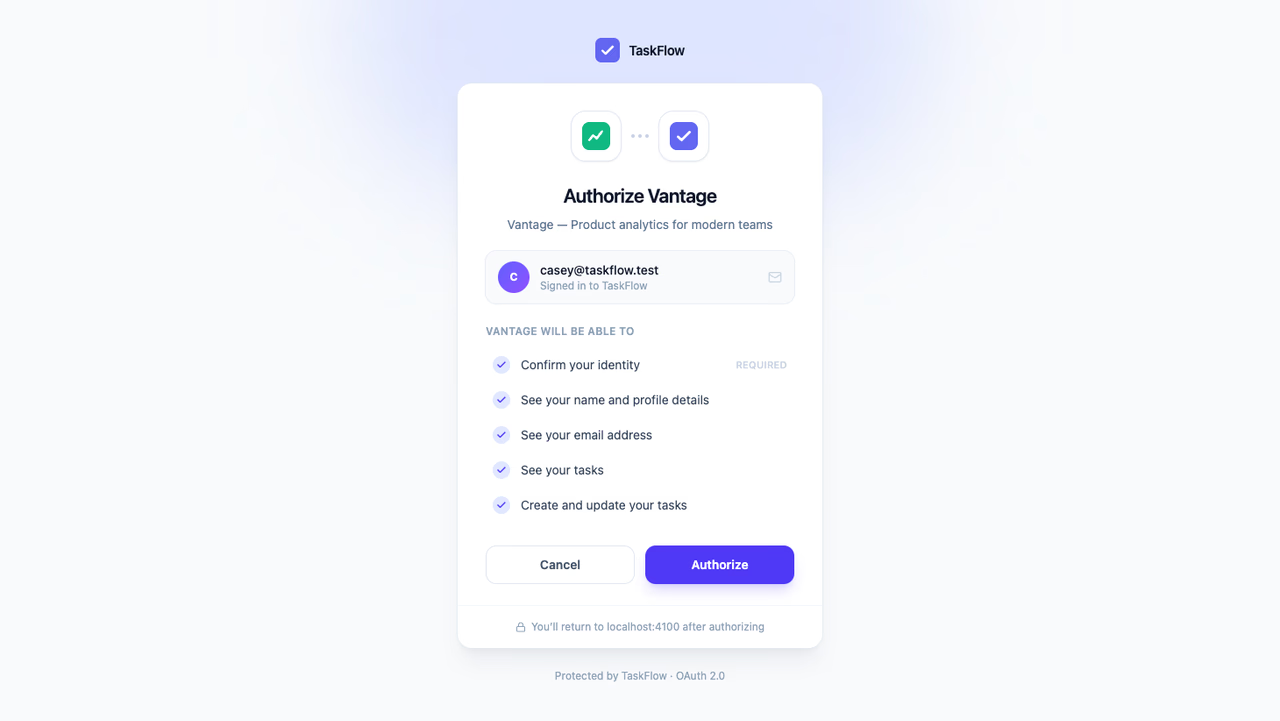
When a user signs in to Vantage now, the consent card lists See your tasks and Create and update your tasks alongside the identity permissions, each one granted or withheld with a click. Users who approved Vantage before this change are asked again, because their earlier grant does not cover the new scopes.
Continue to validate access tokens on TaskFlow's server.
Was this page helpful?
Share what worked or what we should fix. Once approved, our agents automatically apply suggested updates to the docs.