Define the scopes_
Add tasks.read and tasks.write to your OAuth2 server's scopes.
1 min read
Scopes have to be defined on the OAuth2 server before a client can request them. Requesting a scope you have not defined fails the authorization request with invalid_scope.
Add the scopes
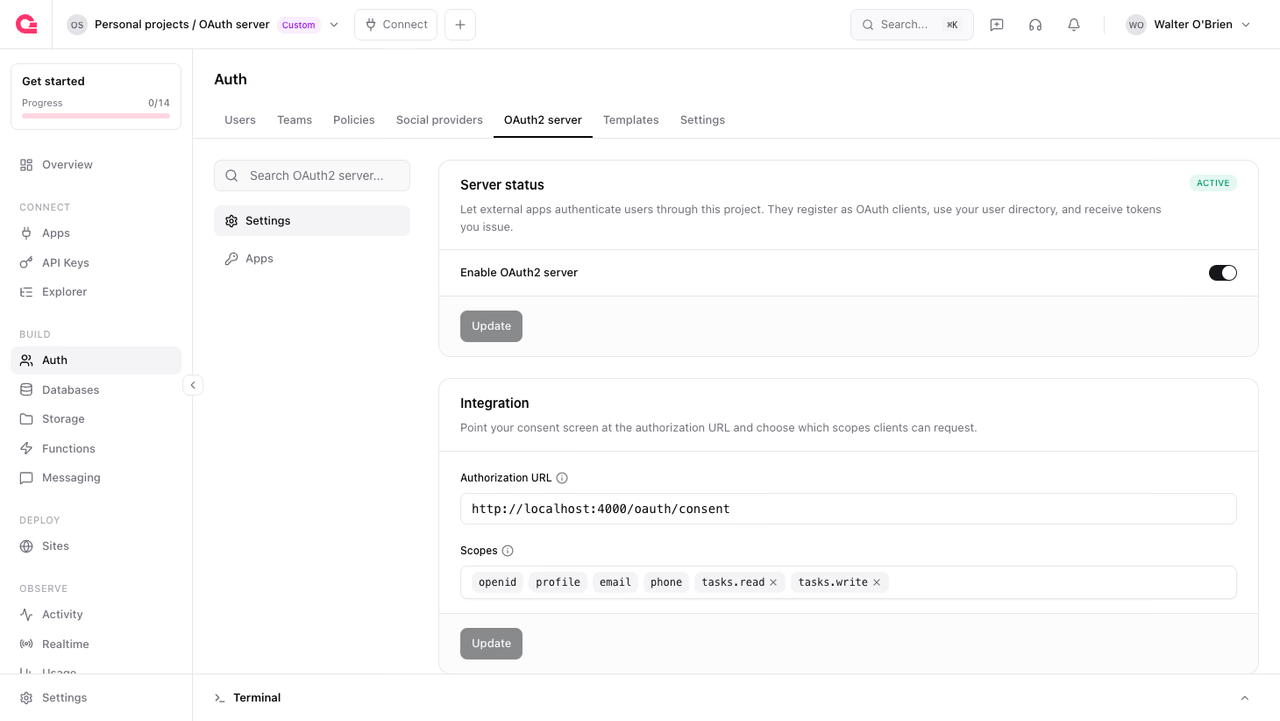
In the Console, open Auth, select the OAuth2 server tab, and find the Scopes field on the Integration card. Add two scopes and click Update:
tasks.readgrants read access to the user's tasks.tasks.writegrants permission to create and update tasks.
The openid, profile, email, and phone scopes stay locked in place. They are always available, so you only define the ones specific to your product.
Naming scopes
The verb:resource shape is a convention, not a requirement. Any string up to 128 characters works. Splitting read and write per resource keeps grants small: an integration that only shows data never has to ask for permission to change it, which is an easier ask on the consent screen.
Both scopes are now published in your project's discovery document under scopes_supported, so integrators can see them without asking you.
Continue to request the new scopes from Vantage.
Was this page helpful?
Share what worked or what we should fix. Once approved, our agents automatically apply suggested updates to the docs.