Resource scopes_
Learn how Appwrite Firewall scopes rules to the project API, a Function, or a Site, and where each scope is enforced.
3 min read
Every Firewall rule has a resource type that limits which traffic the rule can match. Scopes keep API-wide policies separate from policies for a single function or site.
Resource types
| Resource type | Applies to | Resource ID |
|---|---|---|
| API | Project Appwrite API traffic (/v1/...) | Not required (stored empty) |
| Functions | Public traffic to one function, enforced at the edge | Function ID required |
| Sites | Public traffic to one site, enforced at the edge | Site ID required |
Where rules are enforced
- API rules are enforced on requests to your project's Appwrite API. This is the scope to use for Auth, Databases, Storage, and other
/v1services. - Functions and Sites rules are stored on the project and applied to that function's or site's public traffic on the Appwrite Network edge.
- Function and site rules do not block the Console or the management API calls that create, update, or deploy those resources. A deny rule on a function does not stop
GET /v1/functions/{id}from the Console or a valid API key.
When to use API
Use API for project-wide API controls:
- Block abusive client IPs across Auth, Databases, Storage, and other API services
- Rate limit a shared path prefix such as
/v1 - Deny traffic from specific countries for the whole project API
When to use Functions
Use Functions to protect or exempt the public traffic of one function:
- Rate limit a public webhook function
- Deny non-
POSTmethods on an HTTP-triggered function endpoint - Bypass Firewall checks for a trusted caller IP on that function only
When to use Sites
Use Sites for the public traffic of one deployed web app:
- Redirect a deprecated path on one site
- Deny admin paths on a marketing site
- Rate limit form submission paths for one site
Attack mode is available only in this scope. Select a site on the Firewall page to challenge every visitor with one click during an incident.
Resource selector in the Console
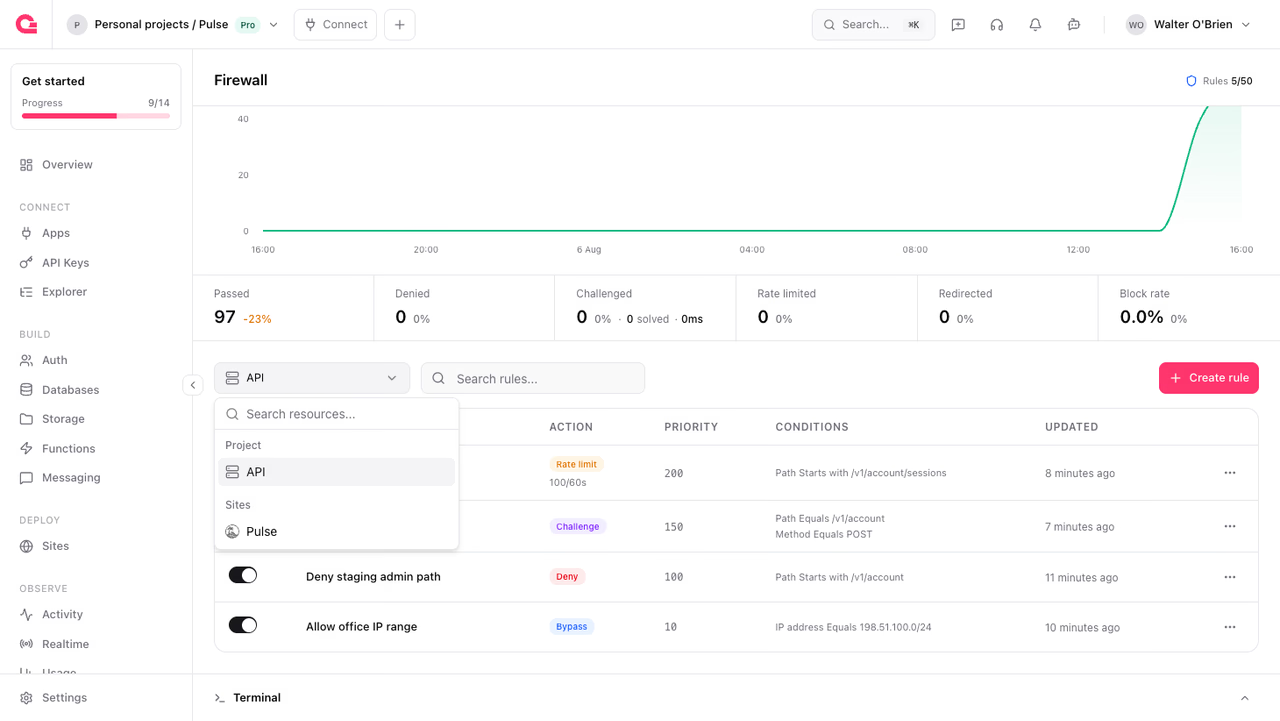
The Firewall page filters the rules list with a resource selector. The Project group holds the API scope, and each function and site appears under its own group. If you create a rule while a function or site is selected, the wizard preselects that resource. You can change the resource type in the create wizard, or later from the rule's Update action.
Was this page helpful?
Share what worked or what we should fix. Once approved, our agents automatically apply suggested updates to the docs.